Security and privacy
A doorbell opens a door onto your life. We treat it that way
What follows describes what Dringo actually does, measure by measure, and what it does not do. No vague promises: what is in place and what is planned is clearly stated.
Signed NFC tap required to ring, blocking in one tap, new QR in one click.
In an apartment building, the list of residents is only shown in front of the door.
Video encrypted from phone to phone (DTLS-SRTP): even our relay cannot read it. It is never stored.
Visitor requests disappear after 90 days.
No advertising, no analytics tools, no resale.
All our protections at a glance
Twelve protections, grouped by question. Those marked "by default" are active with nothing to set up.
Who can ring?
NFC tap required by default
To ring, the visitor must tap the plate with their phone. A photo of the QR code is useless from a distance.
Hall screen option
In a building, a QR code that changes every 30 seconds replaces the NFC tap.
No NFC: a written message by default
No ringing and no video, one message per hour, flagged "presence not verified".
Strict mode option
For harassment cases: without proof of presence, nothing gets through.
Who you agree to receive
Canvassing filter by default
A canvasser must introduce themselves: live photo, company, offer. Otherwise it does not ring.
Photo required option
Every visitor takes a photo of themselves before ringing. You see who is there before answering.
Block in one tap by default
The blocked visitor is not told. In a building, a block applies only to you; list and unblock one by one.
You stay unseen by default
Your camera is off. You answer by voice or with a ready-made message, without showing yourself.
What protects residents
Directory invisible from afar by default
The list only shows at the door, and the reply is the same whether or not the person lives there.
Everyone decides by default
Each resident chooses whether to appear, and under what name. Neither the manager nor neighbours see their visitors.
SOS mode by default
Emergency numbers and favourite contacts when the app opens, plus an alert to family or team.
Automatic deletion by default
Requests, photos and messages disappear after 90 days. Calls are never recorded.
Each measure is explained in detail below.
1. The canvassing filter: no introduction, no ring
A canvasser cannot ring like everyone else. They must first say who they are.
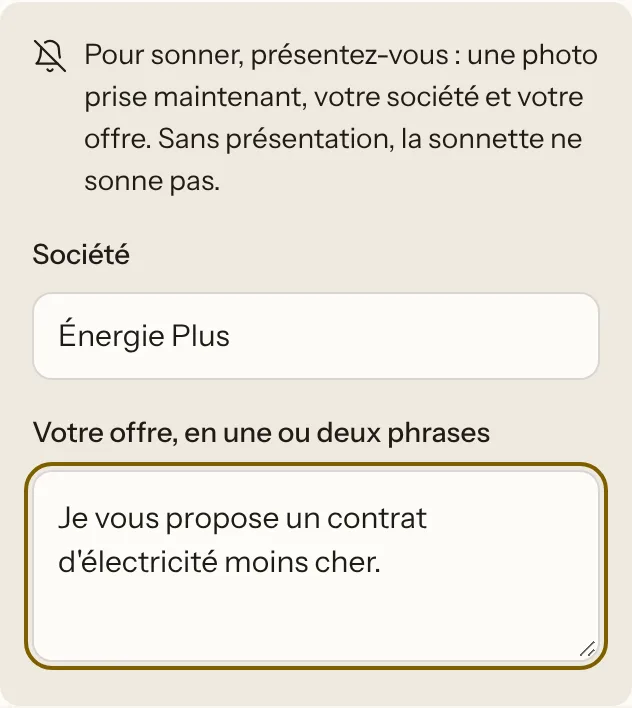
- The visitor states the purpose of the visit. If they choose "Canvassing / sales", the form asks them to introduce themselves.
- Three pieces of information are required: a photo of themselves taken on the spot with the camera (not a picture from their gallery), the name of their company and their offer in one or two sentences.
- If one is missing, it does not ring. Nothing is passed on, and they know it.
- You decide with the facts in hand. You see their photo, company and offer before answering. A canvasser never starts a video call.
- Three settings per door
- "Introduction required" (by default), "Silent": the request goes into the history without disturbing you, or "Refused": the door accepts no canvassing.
- The limit
- A canvasser can lie about the purpose of the visit. In that case, block them: see the next point.
2. Blocking against harassment
Someone who rings too often, or whom you no longer want to hear from, is blocked in one tap.
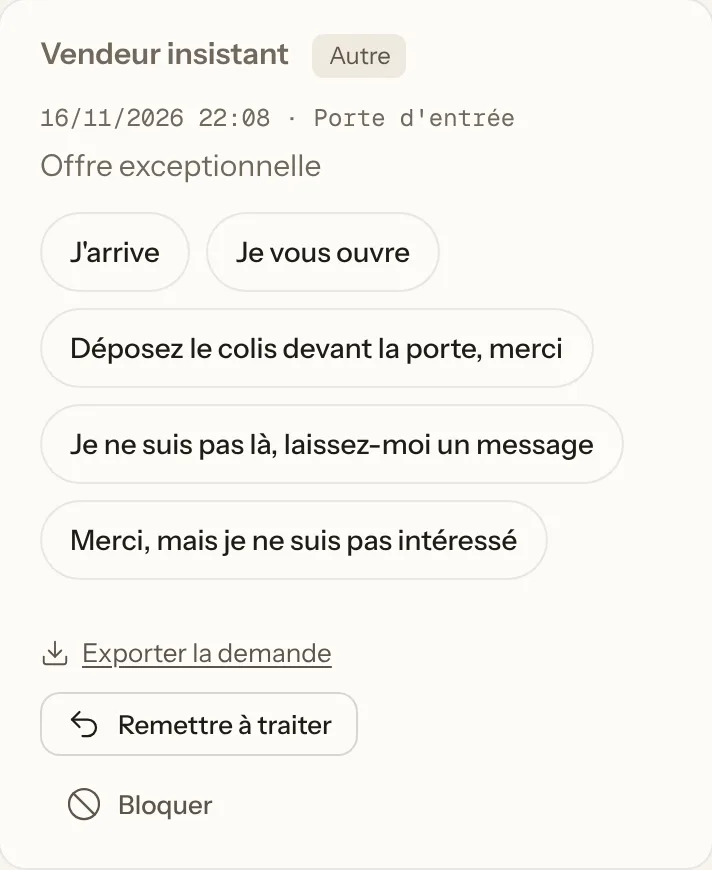
- Block from their ring. Under every request you receive, there is a "Block" button.
- The person is not told. They still see "message sent", but nothing reaches you any more. So they have no reason to try to get around the block.
- Their phone is blocked long-term, and their internet address for 24 hours, in case they switch phones straight afterwards.
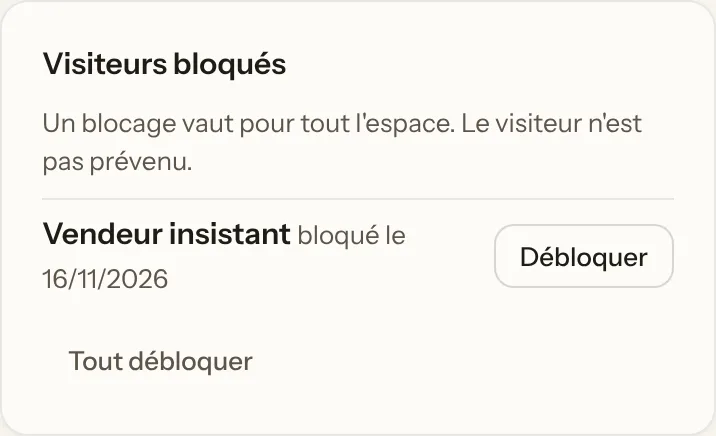
- You stay in control. The list of blocked people is in "My account", and you can unblock them one by one.
- In a building
- A block applies only to you. A delivery driver you block can still reach your neighbours, and nobody else sees whom you have blocked.
- Strict mode
- For harassment cases, this option refuses everything that arrives without proof of presence, including written messages.
- Rate limits
- At most three rings in 5 minutes per visitor, thirty per door in 10 minutes, and an invisible trap field that keeps bots out.
- Keeping evidence
- Under each request you can save to your phone the photo and the message left by the visitor, and export the dated request, for a police report. Live calls are never recorded.
- The limit
- Someone very determined can change phone and network. Blocking stops an ordinary nuisance. Against harassment from a distance, the real protection is the next point.
3. Impossible to ring without standing at the plate
A QR code is an image: it can be photographed and passed around. Here is why that is of no use.
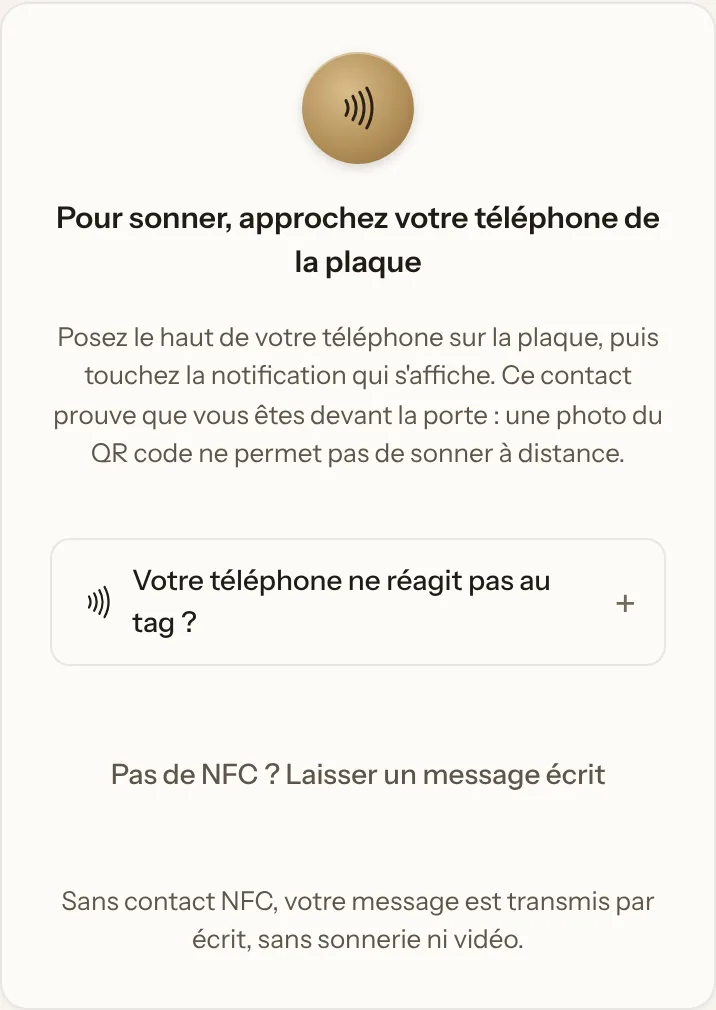
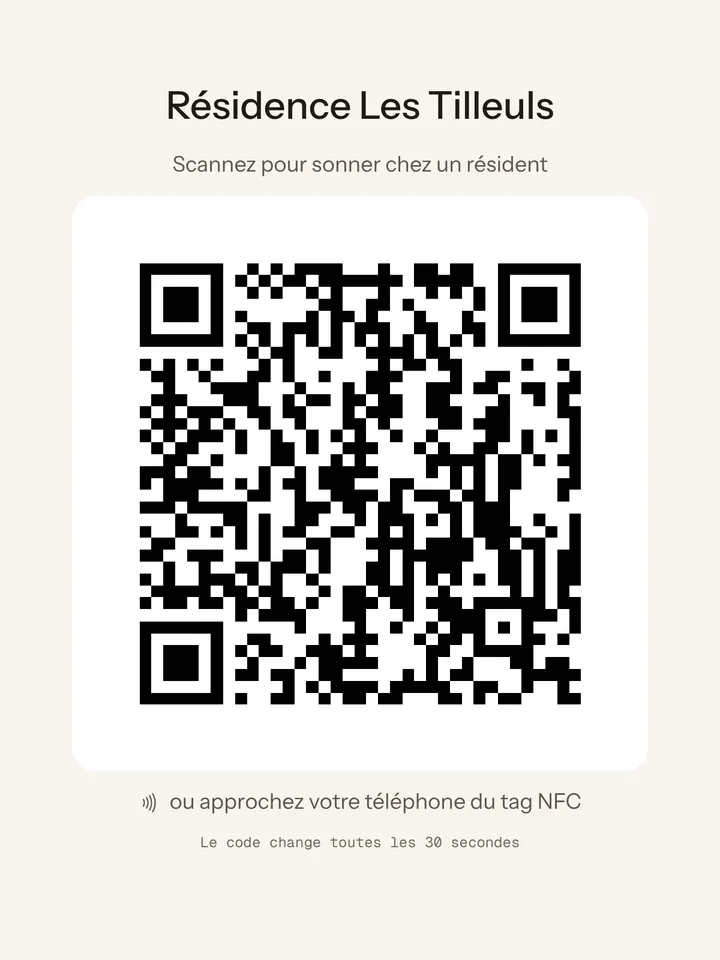
- An NFC tap is required to ring. This is the default setting for every door. Scanning the QR code opens the page, but does not allow ringing or a video call.
- The chip in the plate creates a signed link, different at every tap. The server checks the signature and rejects any link that has already been used. A screenshot or a link passed on to someone else does not work.
- In a building, the hall screen does the same job. Its QR code changes every 30 seconds and expires after 90 seconds at most. A photo taken on another day is useless.
- Without NFC, a written message only. No ringing and no video, one message per hour, flagged "presence not verified". It arrives without a notification, unless you choose to be notified.
- The access granted is short. A proof of presence is valid for 10 minutes and 3 rings.
- If someone sticks a fake QR over it
- The official address is printed in plain text on the plate, so the page that opens can be checked. The QR code is laser-engraved in the aluminium, so it is hard to cover up cleanly. And without the door's secret key, a fake NFC chip produces no valid link.
- Changing the QR code
- A new QR code makes the old one unusable everywhere, immediately. The engraved plate then has to be replaced, at your expense: blocking the visitor is enough in most cases.
- The limit
- A visitor whose phone has no NFC cannot ring: they leave a written message. Checking the phone's location is available as an option, but it can be faked: it is a deterrent, not a guarantee.
4. In a building, everyone chooses what they display
Nobody appears in the directory without having decided to, and nobody can consult it from a distance.
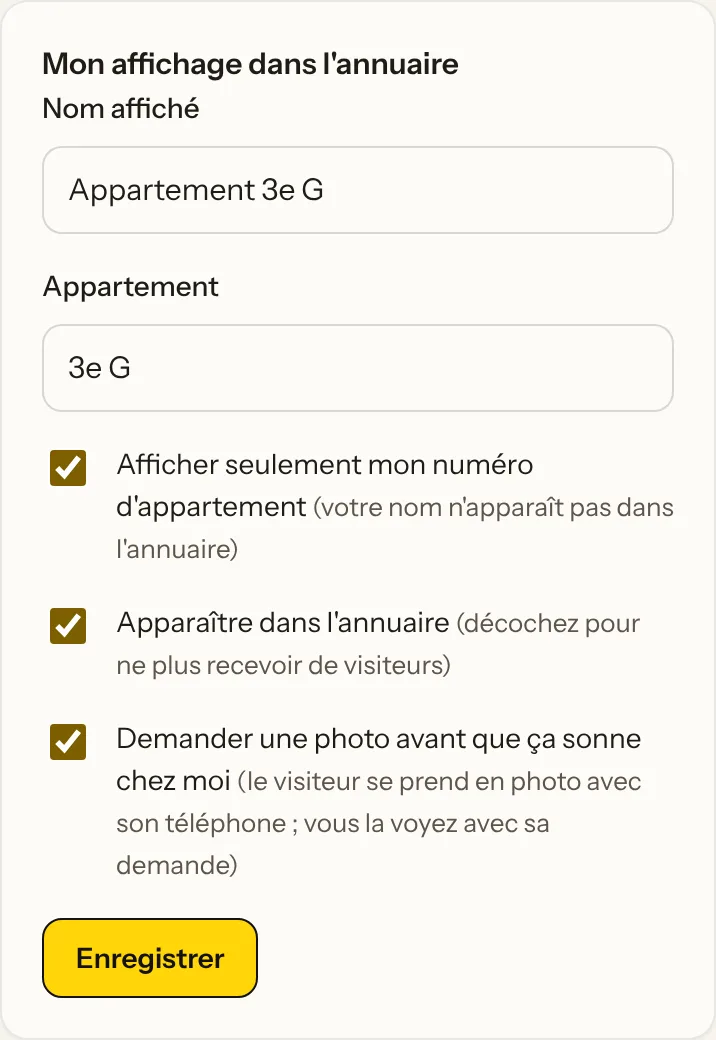
- Each resident chooses how they are displayed: their name, a name of their choice, or only their flat number ("Flat 3 L").
- They can also not appear at all, and remove themselves at any time from their account.
- The directory is only shown at the entrance, after the NFC tap or a scan of the hall screen.
- From a distance, nobody can find out who lives there. Without proof of presence, the visitor must type the exact name or the flat, with at most 5 attempts per 10 minutes. The page always gives the same answer, whether or not the person lives here: "If this person lives here, they have received your message".
- Your visitors are your business alone
- A ring only reaches the chosen resident. Neither the property manager nor the neighbours see who rings at your door.
- Between residents
- A resident does not see the list of other residents, nor their email addresses. Only the property manager handles arrivals and departures.
5. Everyone decides what they require before their bell rings
From the most open to the strictest: you choose how much information is asked of the visitor.
- Always: their name and the purpose of the visit
- Delivery, visit, appointment, service call, canvassing or other. You know who is ringing and why before you answer.
- Optional: a required photo
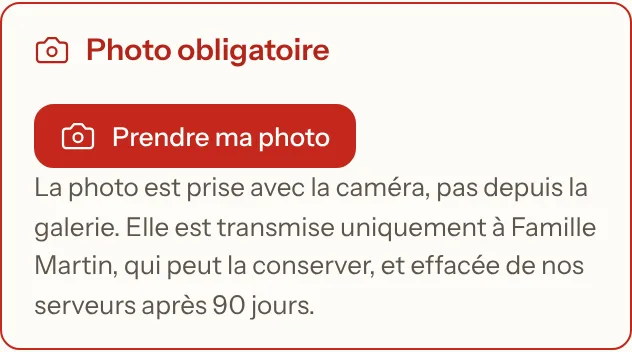
- The visitor takes a photo of themselves with their phone's camera before ringing. Without a photo, it does not ring. In a building, each resident turns this requirement on for themselves only, from their account.
- Optional: a phone number
- To be called back, the visitor can leave their number. Their consent is requested, recorded and time-stamped.
- For canvassing: the full introduction
- Photo, company and offer, as explained in point 1.
- And you show nothing
- Your camera stays off. You answer by voice or with a ready-made message, and you turn your camera on only if you choose to.
The more information you require, the more likely a visitor in a hurry is to give up. A required photo suits situations where security comes before convenience. It also means clearly informing the visitor of how their photo is used; it is deleted with their request after 90 days.
6. The SOS emergency button
A worrying ring, a medical emergency, an intrusion: the right numbers are one tap away.
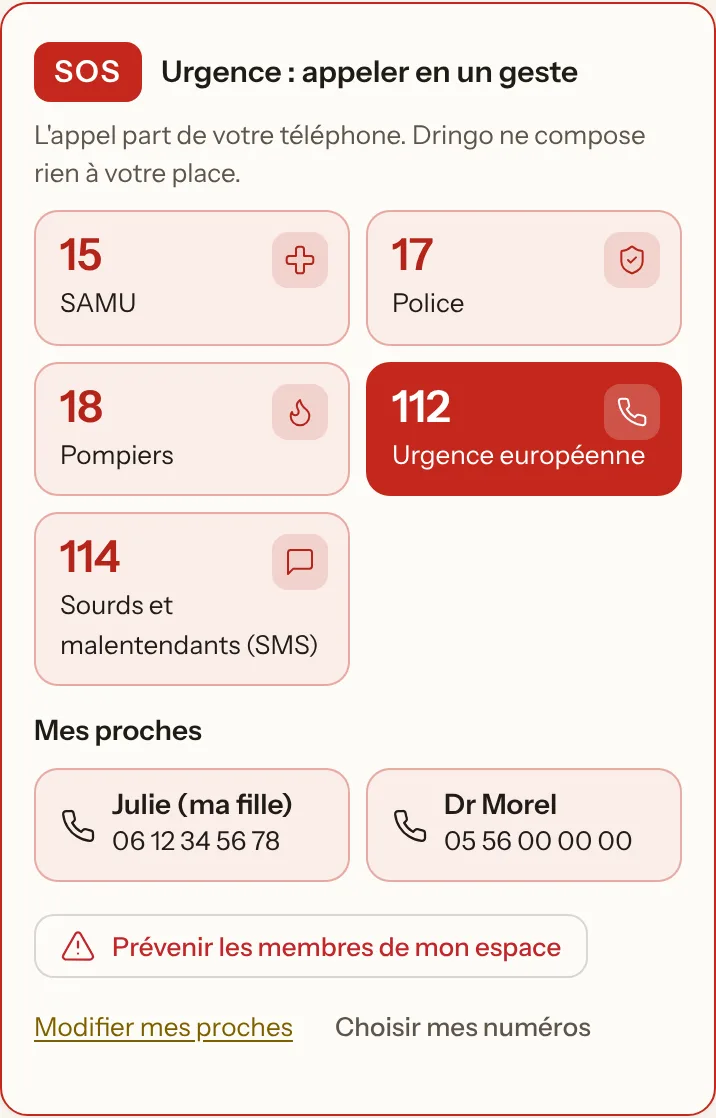
- The SOS button sits at the top of the app, and is also there during a call with a visitor. No need to look up a number in a stressful moment.
- It offers the country's emergency services: in France, the police (17), the ambulance service (15), the fire brigade (18), the European emergency number (112) and 114 by text for deaf or hard-of-hearing people.
- And the people you choose: up to six relatives or useful contacts (a child, a neighbour, a doctor, the caretaker), saved in "My account".
- One tap starts the call from your phone, just as if you had dialled the number.
- Alert your family or team
- A button sends an SOS alert to the other members of your space, on their phones. In a building this alert does not exist: we do not alert every resident.
- Depending on the country
- France, Belgium, Switzerland, Spain, Italy, Germany, United Kingdom: the numbers shown follow the country chosen in your account.
- The limit
- Dringo does not call the emergency services for you and sends them nothing: the call is placed by your phone, so you need network coverage. It is neither an alarm nor a telecare service.
7. Your elderly parents: informed in real time
When a visitor rings at your elderly parents' door, you know at the same moment, wherever you are.
- Every ring also reaches your phone with the visitor's name, the reason for the visit and their photo if they took one.
- You can answer for them by video, by voice or with a ready-made message, without your parents having to open the door.
- You block a pushy salesperson in one tap, so they are not disturbed again.
- You set everything from your phone: mandatory photo, “No canvassing” banner, SOS button and people to alert.
Set this up with your parents' agreement: they can see who is part of their doorbell. Dringo replaces neither a personal alarm service nor the emergency services.
For visitors: the minimum, then deletion
- Only what they enter
- Name, message and, if the door asks for it, a phone number. The IP address is never stored: it is only used, in memory, to curb abuse.
- Automatic deletion
- Requests are deleted after 90 days, with no action needed.
- Clear information
- Every visitor form states who receives the information and how long it is kept.
Video calls and notifications are encrypted
- Video encrypted from phone to phone
- Calls use WebRTC, for which encryption (DTLS-SRTP) is mandatory. When a relay is needed, on 4G for example, it carries data it cannot read: even our relay cannot see the video. Calls are never recorded.
- Short-lived relay credentials
- Access credentials for the video relay are generated for 35 minutes (a call lasts 30 minutes at most). The secret that produces them never leaves the server.
- Your camera stays off
- You see the visitor; they do not see you. The "Show me" button turns your camera on only if you choose to.
- Encrypted notifications
- The content of notifications is encrypted for your device (Web Push standard, RFC 8291): the Apple, Google or Mozilla services that deliver them cannot read it.
Accounts and application
- Passwords
- Stored in irreversibly hashed form (bcrypt), with a minimum of 10 characters. Login attempts are limited per address and per account.
- Sessions
- Random 256-bit token, kept on the server only as a hash. The cookie is inaccessible to scripts and restricted to our site.
- Browser protections
- Strict Content Security Policy (no third-party or inline scripts in the page), rejection of actions coming from another site, HTTPS enforced.
- Invitations
- Random links, valid for 7 days, stored as a hash. Only the space's administrator can invite or remove someone.
- Right to erasure
- Deleting your account erases your data immediately, from the Account page.
Against abuse and scams
- Fake or reused QR code
- See point 3, Impossible to ring without standing at the plate.
- Abusive ringing
- Limits per visitor and per door, and an invisible trap field that keeps bots out.
- Bogus callers
- We do not claim to recognise a genuine ID badge from an image: no technology can guarantee that. If in doubt, check with the company using its official number, never the one shown on the badge.
What we do not do
- No facial recognition
- No call recording
- No camera filming continuously
- No advertising, no resale of data
- No analytics tools or advertising trackers; fonts hosted on our own servers
Our limits, stated plainly
- Not an emergency service
- A notification may arrive late. If you are in danger, call 112.
- Not an access control system
- Dringo complements the existing intercom. By default, it does not open the door: the intercom and the keypad still do that. Remote opening (Shelly relay, Nuki lock, smart-home webhook) is an optional feature in testing, reserved for a signed-in member within 5 minutes of a ring.
- Independent audit
- The code has not yet been audited by a third party. An independent security audit is planned; we will publish its summary here.